Target identification
See the name of blocks, entities and supported fluids plus the mod they come from.
Jade shows contextual details about the block, fluid or entity under your crosshair. Match your Minecraft version and loader, then download from the official project source.
Jade is an information HUD for Minecraft Java Edition and a modern successor in the WAILA/HWYLA family. Point at a supported target and a compact overlay can identify it and surface useful context.
Depending on the block, entity, other installed mods and server support, Jade can expose information such as names, health, progress or supported inventory details while you stay in the game world.
Never guess from the filename. Match the exact Minecraft version and loader, then use an official project page.
Release availability changes. The official project page is the source of truth for exact files, dependencies and release status.
Useful context appears where you already look, reducing menu hopping and guesswork.
See the name of blocks, entities and supported fluids plus the mod they come from.
Quickly read health and other supported entity information without opening another screen.
Supported blocks can expose useful state such as processing, growth or breaking progress.
With server support and compatible blocks, Jade can reveal richer storage information.
Tune what appears, how much detail you want, and the controls used to toggle information.
Jade exposes an API used by other mods and add-ons to surface their own contextual data.
Most launch failures start with a version or loader mismatch.
Use the exact game version shown on the release page.
Fabric, Quilt, NeoForge and Forge builds are not interchangeable.
Install any dependency listed for that specific release and loader.
| Loader | Best practice | Common mistake |
|---|---|---|
| Fabric | Check Fabric API dependency | Using a NeoForge JAR |
| Quilt | Use the compatible Fabric/Quilt release | Assuming every Fabric mod is Quilt-ready |
| NeoForge | Match the exact modern branch | Mixing Forge and NeoForge files |
| Forge | Verify that Jade supports your Minecraft version | Expecting a Forge build for every new release |
mods.Use the mods folder belonging to the selected game instance.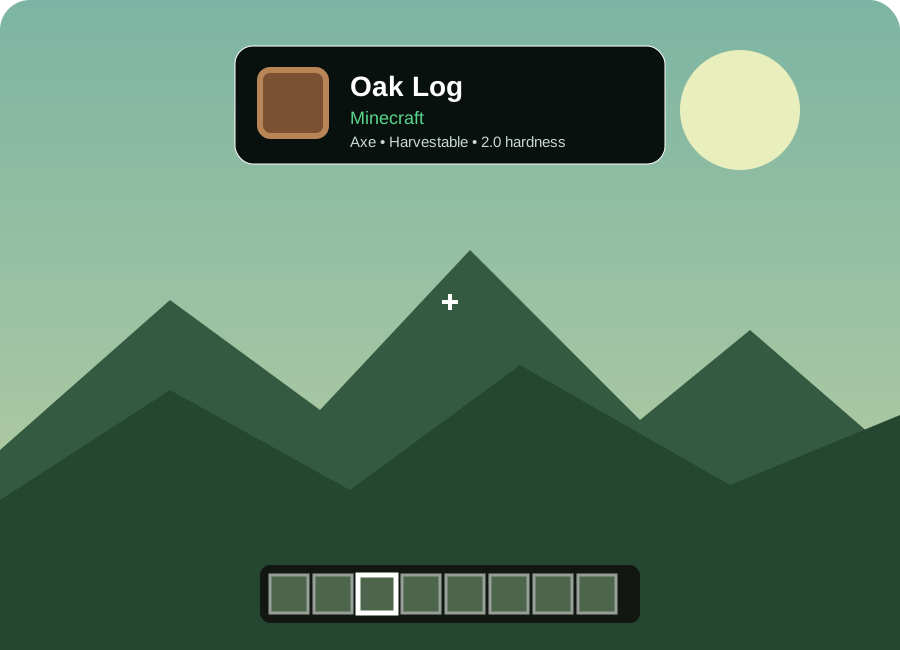
The strongest Jade experience is not about filling the screen. It is about surfacing the one or two facts that help you decide what to do next.
Jade continues the “what am I looking at?” idea with active support for current mod-loader ecosystems.
Useful information is separated from the thing you are currently looking at.
Stay focused on the world while the HUD surfaces relevant information at the point of need.
Start with the simplest checks before rebuilding your whole modpack.
Check Controls → Key Binds → Jade and verify the overlay toggle has not been pressed or remapped.
Remove duplicate Jade files, confirm loader type and check the exact Minecraft version listed for the JAR.
Some data depends on server-side Jade support. Client-only installs may intentionally show less information.
Use Jade configuration to reduce modules, reposition information or disable details you do not need.
Answers to the questions users ask before downloading or troubleshooting.
Jade is a Minecraft Java Edition information HUD mod. It identifies the block, fluid or entity under your crosshair and can show useful contextual details such as health, progress and supported inventory information.
No. The official Jade project is for Minecraft Java Edition and uses Java mod loaders. Bedrock add-ons are a different format.
Current and historical releases are available across Fabric, Quilt, NeoForge and Forge, but support varies by Minecraft version. Always match the exact game version and loader before downloading.
Yes, core identification features can work client-side. Some richer information is only available when the server also has Jade installed.
A common cause is the overlay toggle keybind. Check Minecraft Controls and the Jade category, then verify your selected profile loads the correct Jade file.
For Fabric installations, follow the dependency information shown on the official release page. Fabric API is commonly required for Fabric builds.
No. This is an independent informational site template. Download buttons send visitors to official project sources instead of repackaging the mod file.
Pick the right version and loader, then continue to an official project page. This site does not repackage or mirror the mod JAR.
Version guidance, loader support and feature descriptions should be checked against the official Jade project pages before publishing changes. The included content intentionally avoids pretending to be the official developer site.